Private Transfers
Send anonymous transactions using Privacy Cash to protect your financial privacy. reply.cash integrates Privacy Cash to enable private transfers of SOL, USDC, and USDT using zero-knowledge proofs, encrypted UTXOs, and a relayer system to completely break the link between senders and recipients.
Table of Contents
- Supported Tokens
- What is Privacy Cash?
- How It Works
- The Private Balance System
- Step-by-Step Guide
- Fee Structure
- Privacy Best Practices
- Troubleshooting
- Security & Audits
Supported Tokens
reply.cash supports private transfers for the following tokens:
| Token | Decimals | Contract Address |
|---|---|---|
| SOL | 9 | Native |
| USDC | 6 | EPjFWdd5AufqSSqeM2qN1xzybapC8G4wEGGkZwyTDt1v |
| USDT | 6 | Es9vMFrzaCERmJfrF4H2FYD4KCoNkY11McCe8BenwNYB |
What is Privacy Cash?
Privacy Cash is a privacy protocol on Solana that enables confidential transactions through:
-
Zero-Knowledge Proofs (ZK Proofs): Cryptographic proofs that let you prove you have a valid deposit without revealing which specific deposit is yours
-
Encrypted UTXOs: Each deposit creates encrypted unspent transaction outputs that only you can decrypt and access
-
Relayer System: Third-party relayers sign and broadcast your withdrawal transactions, preventing any on-chain link between your wallet and the withdrawal
-
Append-Only Merkle Trees: Efficient data structures that store commitments and enable privacy-preserving withdrawals
The protocol has processed over $190M+ in transaction volume and maintains full open-source transparency with 14 security audits and formal verification by Veridise.
Privacy Cash Resources
-
Official Docs: privacycash.mintlify.app
-
Website: privacycash.org
How It Works
Privacy Cash uses a two-step process to ensure complete transaction privacy:
1. Shield (Deposit to Private Balance)
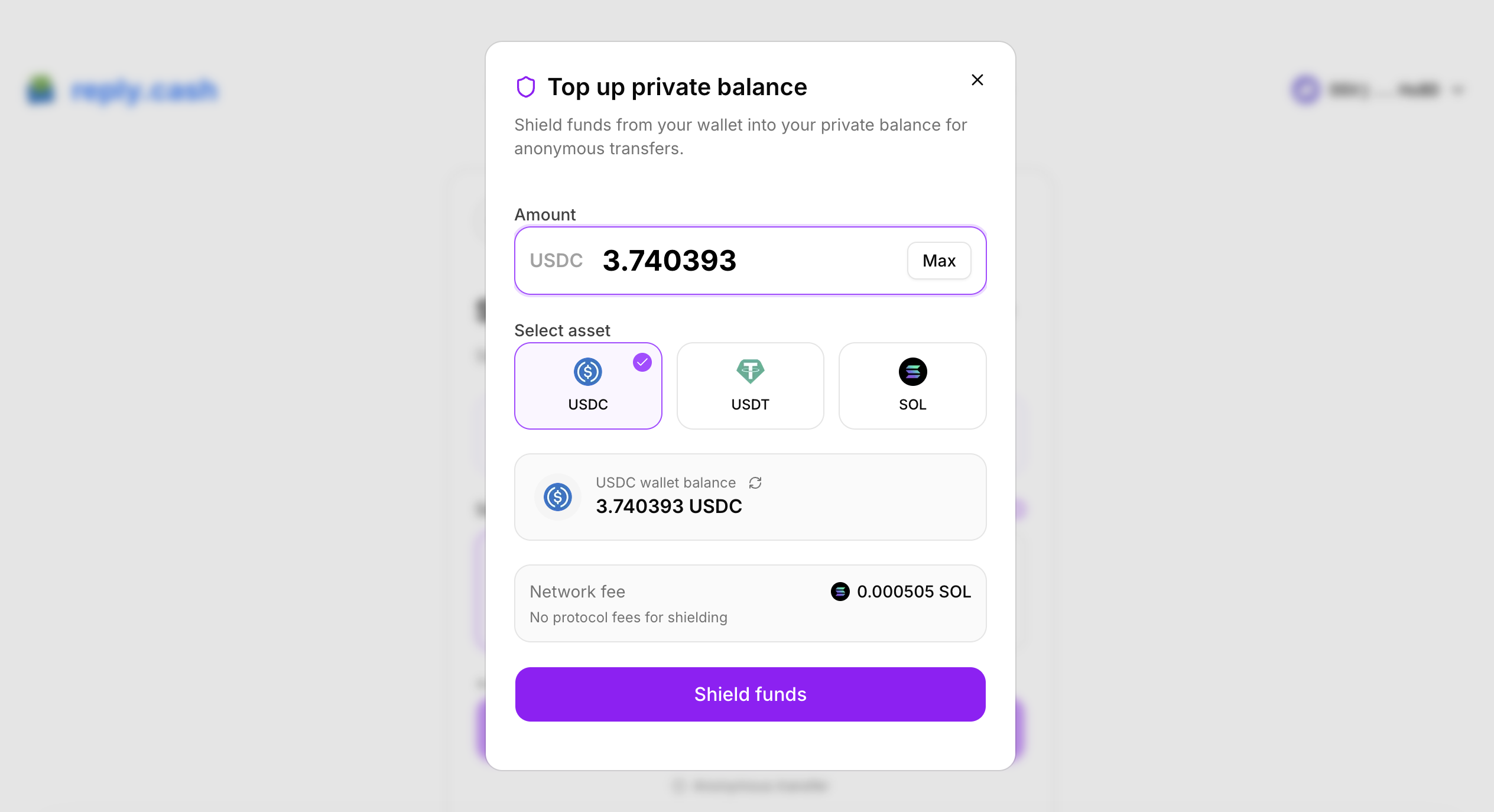
When you shield funds, you're moving tokens from your regular wallet into an encrypted private balance that only you can access:
Regular Wallet → Privacy Pool → Encrypted UTXO (only you can decrypt)
What happens during shielding:
-
You initiate a deposit from your regular wallet
-
You sign the transaction to authorize the deposit
-
The transaction is submitted to Solana
-
An encrypted UTXO is created that only your keys can access
-
Your private balance updates once confirmed
Key Point: Your encryption keys are deterministically derived from signing a fixed message ("Privacy Money account sign in"). This means only you can ever access your private balance — the keys exist only in your browser session.
2. Unshield (Withdraw from Private Balance)
When you withdraw, a ZK proof proves you own funds in the privacy pool without revealing which deposit is yours:
Private Balance → ZK Proof Generation → Relayer Broadcast → Recipient Receives Funds
What happens during withdrawal:
-
The system selects your encrypted funds to cover the withdrawal amount
-
A cryptographic proof is generated proving you have valid funds (takes 5–15 seconds)
-
A relayer signs and broadcasts the transaction — you don't pay gas
-
The recipient receives funds with zero on-chain connection to your deposit
Critical Privacy Guarantee: The withdrawal transaction contains absolutely no information about the original depositor. The ZK proof mathematically prevents anyone — including the relayer — from knowing which deposit corresponds to which withdrawal.
The Private Balance System
reply.cash implements Privacy Cash through a "Private Balance" system — a separate, encrypted balance that you top up and withdraw from.
Your Private Balance
Think of it as a private vault:
-
Regular Wallet Balance: Visible on-chain, tracked publicly
-
Private Balance: Encrypted, only you can see it, transactions are untraceable
You can hold USDC, USDT, and SOL simultaneously in your private balance.
Viewing Your Private Balance
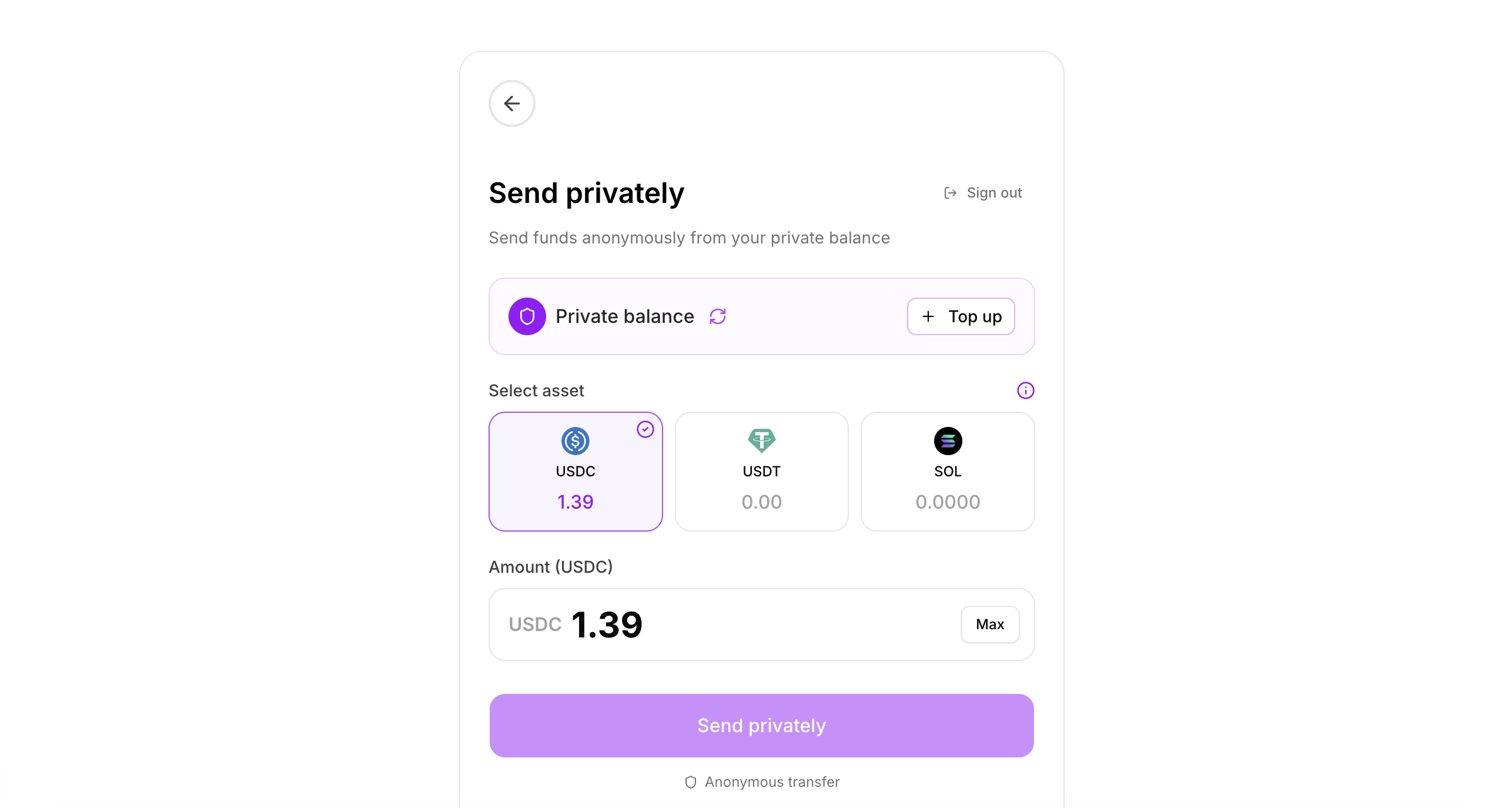
After signing in to private transfers, you'll see your private balance displayed with:
-
Individual balances for each supported token (USDC, USDT, SOL)
-
A refresh button to update balances
-
A "Top up" button to add more funds
Balances automatically refresh after deposits and withdrawals. Use the refresh button if your balance doesn't update immediately.
Step-by-Step Guide
Step 1: Access Private Transfers
-
Navigate to Send in the app
-
Select "Private Transfer" from the payment method options
-
You'll see the private transfer interface with a purple theme
Step 2: Sign In (First Time Only)
If you haven't used private transfers before:
-
Click "Sign in" when prompted
-
Your wallet will ask you to sign a message:
"Privacy Money account sign in" -
This signature derives your encryption keys — it does NOT cost any SOL
-
Once signed, you're authenticated for this session
Important: You must sign this message each time you start a new session. Your encryption keys are derived from this signature and are never stored.
Step 3: Top Up Your Private Balance (Shield)
Before sending privately, you need funds in your private balance:
-
Click "Top up" to open the shielding modal
-
Select the asset you want to deposit (USDC, USDT, or SOL)
-
Enter the amount to shield
-
Review the network fee (shown in SOL)
-
Click "Shield funds"
-
Sign the transaction in your wallet
-
Wait for confirmation (usually 10–30 seconds)
Shield Progress:
- Initializing...
- Shielding funds...
- Confirming...
- Complete!
Step 4: Send Privately (Unshield)
Once you have a private balance:
-
Select the asset to send from the grid (shows your private balance for each)
-
Enter the amount to send
-
Enter the recipient's Solana address (or .sol domain)
-
Review the fee breakdown and recipient receives amount
-
Click "Send privately"
-
Wait for ZK proof generation (5–15 seconds)
-
Transaction is broadcast via relayer
Withdraw Progress:
- Initializing...
- Generating ZK proof... (this is the longest step)
- Confirming...
- Complete!
Step 5: Success
After a successful private transfer, you'll see:
-
Amount sent from your private balance
-
Fee breakdown (relayer fee + protocol fee)
-
Amount the recipient actually received
-
Transaction signature (viewable on explorer)
-
Your remaining private balance
Fee Structure
Shielding (Deposit) Fees
Shielding has NO protocol fee — you only pay network costs:
| Component | Amount | Description |
|---|---|---|
| Base transaction fee | ~0.000005 SOL | Solana network fee |
| Priority fee | ~0.0005 SOL | Faster confirmation |
| ATA rent (if first deposit) | ~0.002 SOL | One-time account creation |
Typical shield cost: ~0.0005 SOL (or ~0.0025 SOL for first deposit of a token type)
Unshielding (Withdraw) Fees
Withdrawals have fees deducted from the withdrawn amount:
| Component | Amount | Description |
|---|---|---|
| Relayer fee | ~$0.60 equivalent | Covers ZK proof relay + network costs |
| Protocol fee | 0.35% of amount | Privacy Cash protocol fee |
Fee Examples:
| Send Amount | Relayer Fee | Protocol Fee (0.35%) | Total Fee | Recipient Gets |
|---|---|---|---|---|
| 10 USDC | ~$0.60 | ~$0.035 | ~$0.64 | ~9.36 USDC |
| 50 USDC | ~$0.60 | ~$0.175 | ~$0.78 | ~49.22 USDC |
| 100 USDC | ~$0.60 | ~$0.35 | ~$0.95 | ~99.05 USDC |
| 1 SOL | ~0.004 SOL | ~0.0035 SOL | ~0.0075 SOL | ~0.9925 SOL |
Minimum Amounts
To prevent dust attacks and ensure reasonable fee ratios:
| Token | Absolute Minimum | Recommended Minimum | Fee at Recommended |
|---|---|---|---|
| USDC | 1.01 USDC | 10 USDC | ~6.4% |
| USDT | 1.01 USDT | 10 USDT | ~6.4% |
| SOL | 0.01 SOL | 0.05 SOL | ~15% |
Note: Sending amounts below the recommended minimum will result in high fee percentages (shown as a warning in the app).
Privacy Best Practices
What Private Transfers Protect
-
Sender Identity: Your wallet address is not linked to withdrawals
-
Recipient Privacy: The source of funds is obscured
-
Amount Correlation: With proper timing, amounts cannot be easily linked
What Private Transfers Do NOT Protect
-
Recipient Address: The recipient address is visible on-chain (the withdrawal transaction shows the destination)
-
Your Wallet Balance: Your regular wallet balance remains visible
-
Deposit Timing: Your initial deposit into the privacy pool is a normal, visible transaction
Maximum Privacy Tips
-
Wait Before Withdrawing: Don't withdraw immediately after depositing. Wait hours or days to increase the anonymity set.
-
Use Different Amounts: Don't withdraw the same amount you deposited. Split into smaller amounts or round to common figures.
-
Use Common Amounts: Deposit and withdraw round numbers (1 SOL, 10 USDC, 100 USDC) that blend with other users.
-
Use Intermediate Wallets: For maximum privacy:
Your wallet → Shield → Private Balance → Unshield → NEW wallet → Final destination -
Don't Send to Yourself: Withdrawing to your own wallet provides no privacy benefit — fees apply with no gain.
-
Avoid Timing Patterns: Don't deposit and withdraw at the same time every day.
CEX Withdrawal Warning
DO NOT withdraw directly to centralized exchanges from your private balance. CEXs may link the withdrawal to your account, which defeats the purpose of private transfers.
Instead, use an intermediate wallet:
Private Balance → Unshield → New clean wallet (Phantom/Solflare/Backpack) → CEX
Troubleshooting
"Sign in" Required Each Session
This is expected behavior. Your encryption keys are derived from your wallet signature and are never permanently stored for security reasons.
"Generating ZK proof..." Takes Too Long
ZK proof generation typically takes 5–15 seconds but can vary based on browser performance and network conditions.
If it takes longer than 30 seconds, try:
-
Refreshing the page and re-authenticating
-
Using a different browser
-
Ensuring a stable internet connection
Transaction Failed During Shield
If shielding fails:
-
Check you have sufficient SOL for network fees (~0.003 SOL)
-
Ensure the amount doesn't exceed your wallet balance
-
Try again — network congestion can cause temporary failures
Your funds remain safe in your wallet if shielding fails.
Transaction Failed During Unshield
If unshielding fails:
-
Check your private balance has sufficient funds
-
Ensure the amount meets minimum requirements
-
Verify the recipient address is valid
Your private balance is preserved if unshielding fails — no funds are lost.
"Minimum withdraw amount" Error
The protocol enforces minimum withdrawals:
-
USDC/USDT: At least 1.01
-
SOL: At least 0.01
Amounts below these will be rejected.
High Fee Warning
If you see "Fees are X% of this transaction":
-
Consider sending a larger amount
-
Fees have a fixed component (~$0.60) so small amounts have high percentage fees
-
Recommended minimums keep fees under ~10%
Private Balance Shows Zero After Deposit
-
Click the refresh button to update balances
-
Wait a few seconds for the transaction to confirm
-
Check that the shield transaction was successful on the explorer
Security & Audits
Privacy Cash has undergone extensive security review:
-
14 Security Audits from leading firms
-
Formal Verification by Veridise
-
Open Source — all code is publicly auditable at github.com/Privacy-Cash/privacy-cash
All cryptographic operations run entirely client-side in your browser. reply.cash never has access to your encryption keys or private balance information.
FAQ
Is my private balance stored on reply.cash servers?
No. Your private balance exists as encrypted UTXOs on the Solana blockchain. reply.cash never has access to your encryption keys or balance information.
Can reply.cash see my private transfers?
No. reply.cash cannot see your private balance, your deposits or withdrawals, or the connection between deposits and withdrawals. All this information is encrypted and only accessible with keys derived from your wallet signature.
What happens if reply.cash goes offline?
Your private balance remains safe on the Solana blockchain. You can access it using any other Privacy Cash interface, or by using your wallet signature to derive your encryption keys directly.
Are private transfers reversible?
No. Like all blockchain transactions, private transfers are irreversible once confirmed. Always double-check recipient addresses.
Why do I need SOL for shielding but not unshielding?
-
Shielding: You pay network fees directly from your wallet (requires SOL)
-
Unshielding: The relayer pays network fees and deducts the relayer fee from your withdrawal amount
Related Resources
-
Getting Started Guide — Wallet setup
-
How to Send Money — General sending instructions
-
Preferred Payment Methods — Configure quick actions
-
Troubleshooting — Fix common issues
-
FAQ — Common questions
Privacy Cash enables financial privacy through zero-knowledge proofs. For more technical details, visit the official Privacy Cash documentation. Always use best practices to maximize your privacy protection.